Is Your React, Vue or Angular Site Invisible to AI Crawlers?
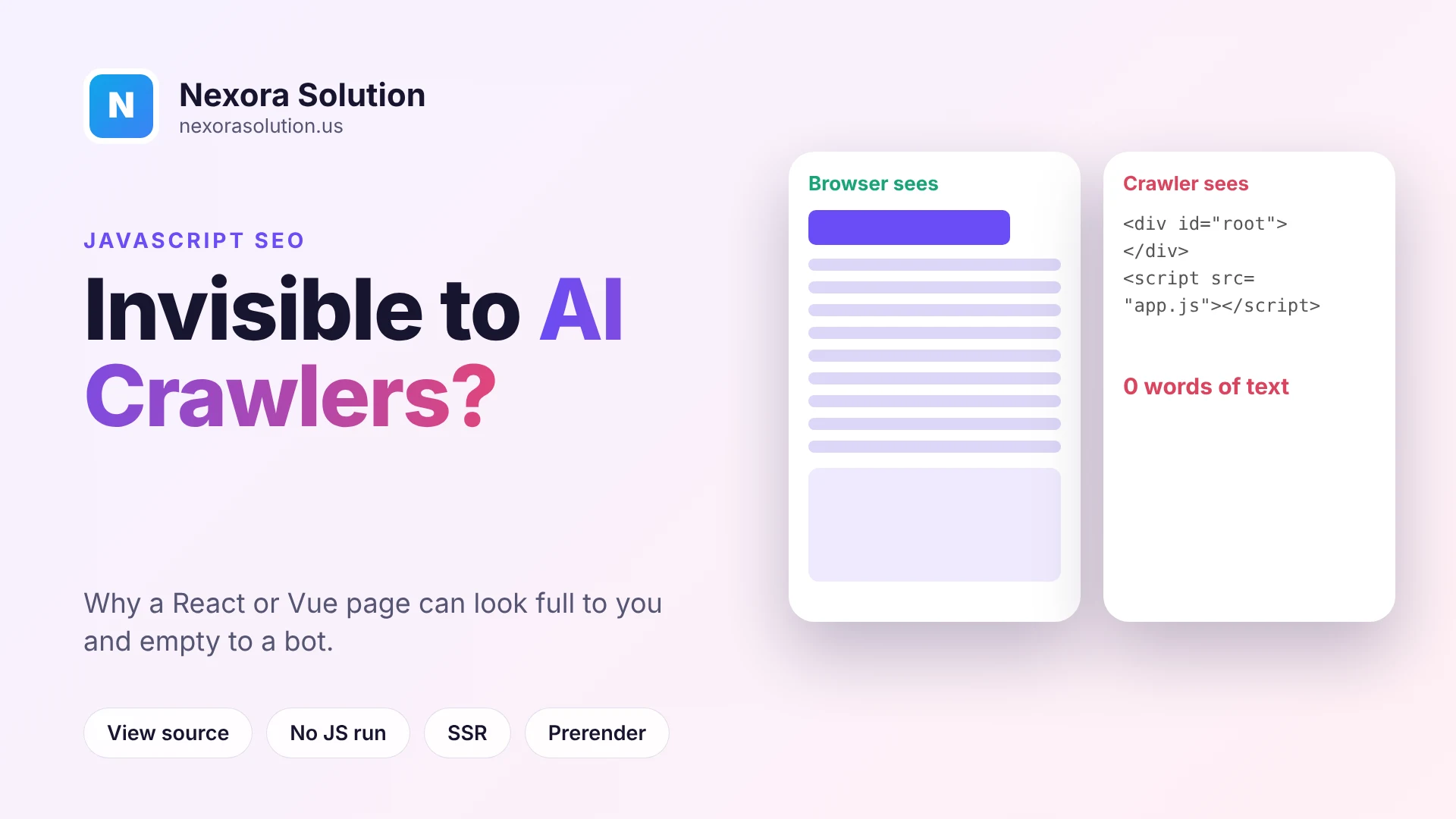
A plain-English explanation of why client-side rendered sites can look empty to AI crawlers, how to test your own pages in a minute, and the options for fixing it.
A page can look perfect and still be empty
Open your website in a browser and it looks right. Headline, paragraphs, pricing, the lot. Now imagine that the same page, fetched by a program that does not run any JavaScript, arrives as a blank white rectangle and a line that says "You need to enable JavaScript to run this app."
For a lot of modern sites, that is not an imagined problem. It is exactly what the server sends. The browser then downloads scripts, runs them, and builds the page you see. A person never notices, because the browser does the work. But a crawler that only reads the first response sees the shell and leaves.
This article explains who can and cannot run that JavaScript, how to check your own pages in about a minute without any tool, and what to do if the answer is bad. It is written for people who own or manage a site, not only developers, so the explanations come before the fixes.
Two ways a page can be built
It helps to separate two approaches, because everything else follows from them.
In server-rendered pages, which includes static sites and classic WordPress, the server sends complete HTML. The text of the page is in that first response. Whatever reads it, a human's browser or a bot, gets the words straight away.
In client-side rendered pages, the server sends a nearly empty HTML file and a bundle of JavaScript. The script fetches the data, creates the elements, and fills the page in. React apps built with Create React App or a basic Vite setup work this way by default, as do many Vue and Angular single-page apps.
Neither is wrong for a web app behind a login. The trouble starts with public pages that you want found, because a visitor who cannot run scripts gets nothing.
Who runs JavaScript and who does not
Googlebot has rendered JavaScript for years. It fetches the HTML, queues the page for rendering, and eventually sees the finished version. That is why client-rendered sites can rank in Google, sometimes slowly.
The AI crawlers are different. In December 2024, Vercel and the research firm MERJ published an analysis of crawler behaviour across a large set of real requests. Their finding was that none of the major AI crawlers they tested rendered JavaScript. The list included OpenAI's GPTBot, OAI-SearchBot and ChatGPT-User, Anthropic's ClaudeBot, PerplexityBot, Meta's crawler and ByteDance's. Some of them downloaded JavaScript files, ChatGPT's and Claude's in a noticeable share of requests, but they did not execute them. Gemini was the exception, because it uses Google's own crawling infrastructure and so has Googlebot's rendering.
Two points of caution. That study is a snapshot from the end of 2024, and the behaviour of any crawler can change, so check again rather than assume. And it measured crawlers on a particular set of sites, mainly Vercel's network. Still, it matches what most practitioners observe, and it is the safer assumption: if the words are not in the initial HTML, plan on them not being seen.
The consequence is easy to miss. Because Google renders your page, your SEO reports can be green while ChatGPT and Claude see an empty shell. The site appears healthy in every tool that uses a real browser, including most page-speed tests and screenshots.
The one-minute test
You need only a browser.
- Open a page you want AI tools to read.
- Right-click and choose View page source. Do not use Inspect, which shows the page after scripts have run. View source shows what the server actually sent.
- Press Ctrl+F (Cmd+F on a Mac) and search for a sentence from the middle of the page.
If you find it, the text is in the HTML and crawlers that do not run scripts can read it. If you find only a div with an id of root and a few script tags, the page is client-rendered.
A second way is to disable JavaScript for the site in your browser's developer tools settings, reload, and look at what remains. A third way, if you are comfortable with a terminal, is to request the page with curl and read the output. Each method answers the same question: what does a program that does not run scripts receive?
Test more than the homepage. Marketing sites are often rendered correctly at the front while blog posts, product pages or documentation, loaded from an API, are not. It is also common for the text to be in the HTML but the prices, reviews or tables to be filled in later. Check the specific facts you would want quoted.
What a gap looks like in numbers
A more careful way to look at it is as a ratio: how much of the visible text is already in the raw HTML. If most of it is, you are fine. If a small share is, you have a problem.
GeoLint, our free audit at https://nexorasolution.us/tools/geo-audit, runs exactly this comparison. It loads your page once as plain HTML and once in a real browser, and reports how much of the text exists before JavaScript runs. It treats a gap above 60 percent as a client-side rendered page. JavaScript dependence carries 25 of the 100 points in the score. It is free, takes about 20 seconds, needs no signup, and audits the one page you give it.
If you want to understand how to read the other parts of the score, the guide at https://nexorasolution.us/blog/free-ai-search-audits-compared-how-to-read-the-score explains which findings are measured and which are rules of thumb.
Your options, from cheapest to most thorough
There is no single fix. The right one depends on how the site is built and who maintains it.
Option 1: Put the important text in the HTML by hand
For a small site, the simplest approach can be to make sure that the pages you care most about contain their key content as ordinary HTML, not as data fetched later. A short description, the headings and the main facts are often enough to make a page readable.
Option 2: Static generation
If the content does not change by the minute, generate the pages ahead of time. Frameworks such as Next.js, Nuxt, Astro and SvelteKit can build every page to complete HTML at build time. The result is fast, cheap to host and readable by any crawler. For a blog, a documentation site or a brochure site, this is usually the best answer.
Option 3: Server-side rendering
When pages depend on live data, a server can build the HTML for each request. The same frameworks support this. It costs more to run and needs care with caching, but the first response is complete.
Option 4: Prerendering
If rewriting the app is not realistic, a prerendering layer can render your pages in a headless browser and serve the finished HTML to bots. It can work as a stopgap. Be careful with it. Serving materially different content to crawlers than to people is the kind of thing search engines warn about, so the prerendered version should match what a visitor sees.
Option 5: Move the public pages
Some teams keep the app as a single-page application and put marketing and content pages on a separate, server-rendered setup. It is a pragmatic split, since the two kinds of page have different needs.
Whichever you choose, one rule applies: test with view source afterwards, not with your eyes. A page that looks the same in the browser can still be an empty shell.
What this looks like on common setups
A plain React or Vue app built with Vite or a similar tool. The default output is a single HTML file with an empty root element. Unless you add server rendering or prerendering, every public page is an empty shell to a crawler that does not run scripts.
Next.js, Nuxt, SvelteKit and Astro. These frameworks can send complete HTML, and many pages do by default. The catch is data loaded after the page arrives. If a component fetches its text inside the browser after load, that text still is not in the first response, even though the framework is capable of rendering on the server. The framework is not the whole answer; how each page gets its data is.
WordPress. Pages are rendered on the server, so most content is in the HTML. Trouble comes from page builders, tabs and accordions that load their content through background requests, and from themes that fetch posts with JavaScript. View source on a page with tabs and check that the tab text is present.
Website builders. Hosted builders vary. Some produce server-rendered pages, others rely heavily on scripts. You cannot change how they render, so the view-source test tells you what you are working with.
Mistakes that keep the problem alive
A few patterns recur.
Trusting a screenshot. Tools that capture a screenshot or run a Lighthouse test use a real browser. They will show a perfect page. They cannot tell you what a non-rendering crawler saw.
Putting text in images or canvas. A headline baked into a graphic is invisible to every crawler, rendering or not. Keep real text for anything meaningful.
Hiding content behind interactions. Tabs, accordions and "read more" buttons are fine when the content is in the HTML and merely hidden with CSS. They are a problem when clicking the button triggers a fetch.
Loading the answer late. Some pages render a heading in HTML but pull in the body copy from an API after load. The heading is visible to the crawler and the answer is not. This is the most common half-fixed case.
Forgetting about robots.txt and the firewall. A page can have perfect server-rendered HTML and still be turned away at the door. Rendering is the second check. Access is the first. If you have not tested it, the guide at https://nexorasolution.us/geo/robots-txt-ai-bots covers how robots.txt rules affect the AI search bots.
How much does it matter
Be honest about the stakes. If your business gets customers from Google and you do not rely on AI tools, a client-rendered site that Google handles well may be acceptable for now. The cost of rebuilding can outweigh the benefit.
If, on the other hand, you want ChatGPT, Claude or Perplexity to be able to quote you, a client-rendered public page is a closed door. Fixing the text delivery is one of the few changes that moves a page from "cannot be read" to "can be read", and it comes before any wording or markup improvements. A crawler cannot cite a sentence it never received.
That ordering is why we put bot access and JavaScript dependence first in the GeoLint score. Writing better headings for a page that arrives empty is wasted effort.
A short plan for this week
- Pick your five most important public pages.
- View source on each and search for a real sentence.
- Note which are empty shells.
- For those, decide between static generation, server-side rendering and prerendering, with your developer.
- After the change, repeat the view-source test and run the page through an audit.
- Re-check every few months, since both frameworks and crawlers change.
If you would rather have the changes made for you, we offer a GEO fix service for a fixed price and show the score before and after. Details are at https://nexorasolution.us/geo/fix-my-website.
Frequently Asked Questions
Do AI crawlers run JavaScript?
Most do not. A December 2024 analysis by Vercel and MERJ found that the major AI crawlers it tested, including GPTBot, ClaudeBot and PerplexityBot, did not execute JavaScript, while Gemini, which uses Google's infrastructure, did. Behaviour can change, so test your own pages.
Why does my site rank on Google but ChatGPT cannot read it?
Googlebot renders JavaScript, so a client-side rendered page can be indexed. Crawlers that read only the initial HTML get an empty shell from the same page.
How can I check what a crawler sees?
Use View page source, not Inspect, and search for a sentence from the page. If it is missing, the text is added by JavaScript. An audit such as GeoLint compares the raw HTML with the rendered page for you.
Is server-side rendering the only fix?
No. Static generation, prerendering and putting key text in the HTML by hand also work. Static generation is often the simplest for content pages.
Does prerendering count as cloaking?
It can if the version served to bots differs materially from what people see. Keep the prerendered content equivalent to the live page.
Will this change as crawlers improve?
It might. Until you have evidence that a specific crawler renders your pages, the safe approach is to have the text in the first response.
Related Articles
- How to See Traffic from ChatGPT, Claude and Perplexity in Google Analytics 4 — 1 min read
- Invoice Payment Terms: Net 15, Net 30, Due on Receipt and Late Fees — 1 min read
- Free AI Search Audits Compared: How to Read the Score — 1 min read
- GeoLint Fix Service Upgrades: Site Crawl, Speed Test and PDF Report — 1 min read